How to Stop Malicious Packages at the Repository Manager, Before the Build
Malicious npm and PyPI packages can run on a developer machine the moment they are installed. Here's how to block them in Nexus or JFrog before any build pulls them.
Content
Make Your Applications Secure Today
Sign up for a personalized demo to see how DerScanner can meet your Application Security needs
Attackers on September 8, 2025, phished an npm maintainer and published malicious versions of 18 packages, including chalk and debug. These packages have billions of weekly downloads, and the malicious versions stayed live for about 2 hours before they were rolled back. And a week later, the Shai-Hulud worm compromised 187 more npm packages, stealing tokens and cloud credentials and republishing infected versions of other packages owned by the same maintainers.
In June 2026, the Miasma campaign went even further. Attackers pushed malicious code into 32 official Red Hat npm packages, and these packages were published with valid Sigstore signatures. We've analyzed this case in Why Provenance Isn't Enough: Lessons from the Miasma npm Campaign.
Malicious packages in public registries is a modern threat, and security teams should know how to proactively stop them.
Why does a CI/CD scan come too late?
A typical SCA scan runs in the CI/CD pipeline and checks the dependencies of a build. But a developer usually installs a new dependency on their own machine first, and only then pushes the change to the pipeline.
And a malicious package doesn't have to wait for the build. npm runs the package's install scripts (preinstall, install and postinstall) during npm install, as described in the npm documentation. For example, the second wave of Shai-Hulud in November 2025 used a preinstall script to steal environment variables, SSH keys, npm and GitHub tokens, CI/CD variables and cloud credentials, when 621 npm packages were infected.
[IMPORTANT] When a pipeline scan detects a malicious package, the incident may have already started: the install script could have already run on the developer's machine, and on the build server too, if the pipeline installs dependencies before the scan.
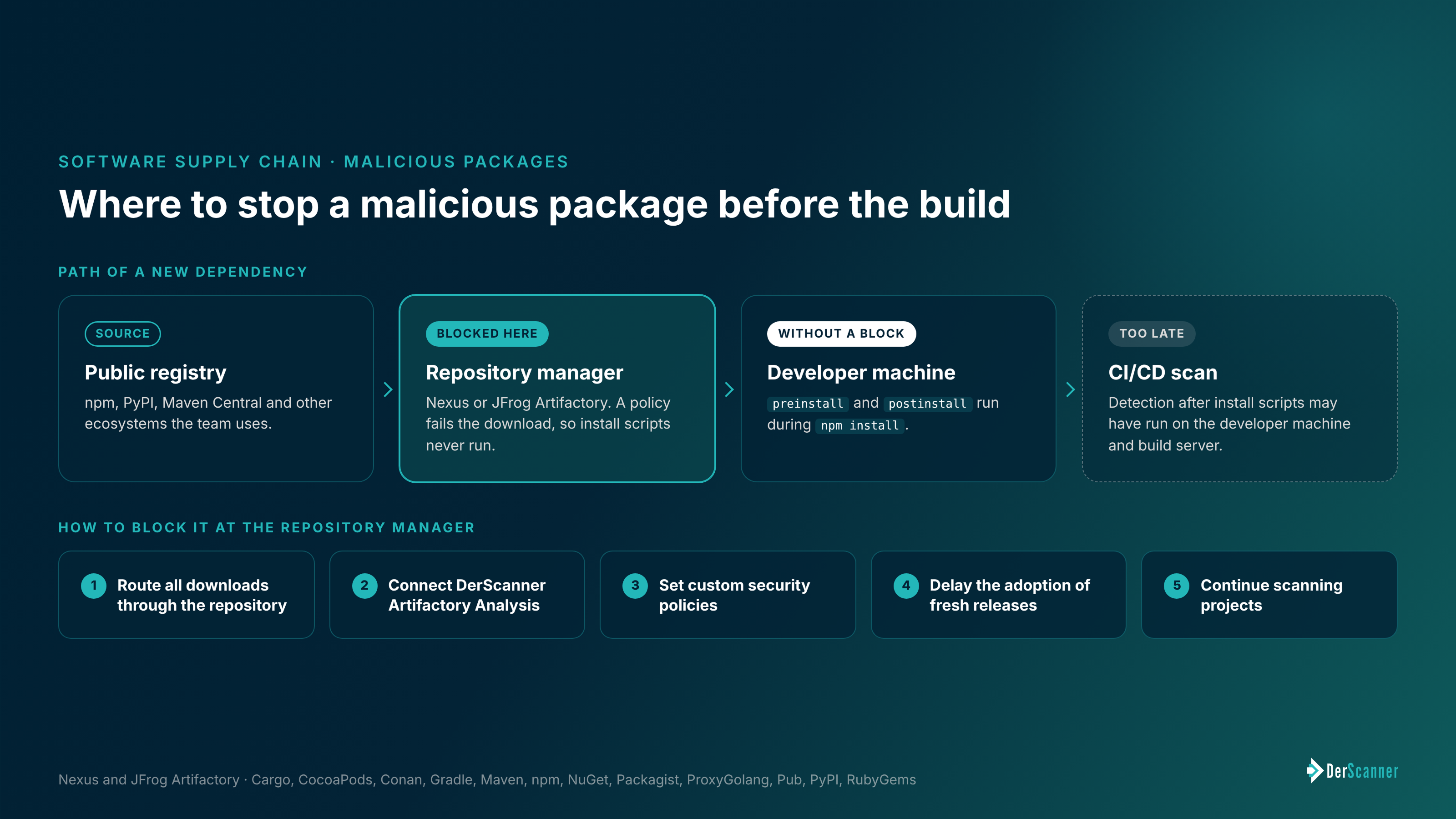
Where should a malicious package be stopped?
At the repository manager, when build tools download dependencies only through Nexus or JFrog Artifactory, EVERY package passes through this single point before it reaches a developer or a build server. We've described this setup in How to Generate an SBOM in an Air-Gapped Environment.
A package that was blocked at the repository never reaches a machine, so its install scripts never run.
How to block malicious packages at the repository manager
1. Route all downloads through the repository manager. Create proxy repositories for the public registries that the team uses (npm, PyPI, Maven Central and others) and point build tools at them. Then close direct access to public registries at the network level, so no download can bypass the repository manager.
2. Connect DerScanner to the repository manager. Artifactory Analysis inspects the repository itself instead of a single project and detects the same risk classes as SCA: known vulnerabilities, supply chain risks and license risks.
[INFO] Supported repository managers: Nexus and JFrog Artifactory. Supported ecosystems: Cargo, CocoaPods, Conan, Gradle, Maven, npm, NuGet, Packagist, ProxyGolang, Pub, PyPI and RubyGems.
3. Set custom security policies. A policy defines which components can't enter the repository, for example, components with a critical CVE or a forbidden license. When a component violates a policy, the download fails at the repository, at the pull moment.
4. Delay the adoption of fresh releases. The malicious chalk and debug versions were live for about 2 hours. A delay of a few days before adopting a new version leaves time for the community to detect and remove it. Dependency update tools such as Renovate support this delay with a minimum release age setting.
5. Continue scanning projects. A repository policy checks components as they enter. DerScanner SCA checks each project's dependencies, and the hybrid SAST and SCA mode traces whether a vulnerable function is actually called from the application code.
[IMPORTANT] A policy can only block what is already known as a risk. A malicious version published an hour ago may not be in any database yet. That's why the delay matters, together with the review of new or changed install scripts.
[NOTE] A completed scan doesn't update itself. When a new vulnerability is published, re-scan the affected projects or their saved SBOMs.
Which supply chain risks does DerScanner detect?
Besides known vulnerabilities, DerScanner SCA checks components for supply chain attack patterns, such as:
-
typosquatting (packages named almost like popular ones);
-
starjacking (packages that link to a popular repository to borrow its reputation);
-
MavenGate (takeover of abandoned Maven namespaces through expired domains).
Since Artifactory Analysis detects the same risk classes as SCA, these checks apply at the repository level too.
How does this help with NIS2 and the CRA?
Under NIS2, security policies have to cover supply chain risks, and Italian NIS2 entities have to implement them by October 31, 2026. We've covered the details in NIS2 in Italy: What the October 31, 2026 Deadline Means for In-House Code. And under the CRA, a manufacturer has to report an actively exploited vulnerability within 24 hours, as described in Cyber Resilience Act Reporting Requirements Are Live. A repository policy reduces the number of risky components that can reach a product in the first place.
If you'd like to try Artifactory Analysis on your own Nexus or JFrog repository, book a demo or request a PoC. We're always up for a chat.
Ready to Reduce Technical Debt and
Improve Security?
Clean code. Fewer risks. Stronger software